





![Apple Watch SE (2nd Gen) [GPS 40mm] Smartwatch with Starlight Aluminum Case with Starlight Sport Band S/M. Fitness & Sleep Tracker, Crash Detection, Heart Rate Monitor](https://www.tech-bit.com/wp-content/uploads/2024/06/applewatchse2ndgengps40mmsmartwatchwithstarlightaluminumcase-360x180.jpg)


![SAMSUNG Galaxy Buds Pro 2 [2022] (SM-R510) - (Gray)](https://www.tech-bit.com/wp-content/uploads/2023/10/samsung-galaxy-buds-pro-2-2022-sm-r510-gray-360x180.jpg)







![Apple iPhone 15 Pro (128 GB) - Black Titanium | [Locked] | Boost Infinite plan required starting at $60/mo. | Unlimited Wireless | No trade-in needed to start | Get the latest iPhone every year](https://www.tech-bit.com/wp-content/uploads/2023/10/apple-iphone-15-pro-128-gb-black-titanium-locked-boost-infinite-360x180.jpg)
![Apple Watch Series 9 [GPS 41mm] Smartwatch with Pink Aluminum Case with Pink Sport Band M/L. Fitness Tracker, Blood Oxygen & ECG Apps, Always-On Retina Display](https://www.tech-bit.com/wp-content/uploads/2023/10/apple-watch-series-9-gps-41mm-smartwatch-with-pink-aluminum-case-with-pink-360x180.jpg)


















Tired of Lugging Around a Heavy Workhorse? Your Search for the Ultimate Business Ultrabook Ends Here.
As a busy professional, your laptop isn’t just a device; it’s your mobile office, your connection to clients, and your gateway to productivity. But the constant drag of a bulky machine can weigh you down, impacting your efficiency and even your posture. You need a laptop that’s as agile and dynamic as you are, offering premium performance without the heft. The question is, when the dust settles on the Dell XPS 13 vs MacBook Air debate, which one truly reigns supreme for your business needs?
The Undisputed Champion for the Modern Business Professional
After rigorous testing and considering the demands of daily business operations, the Dell XPS 13 emerges as the standout choice. It effortlessly blends cutting-edge technology, stunning design, and the robust performance that businesses demand, making it the best Windows ultrabook on the market.

Dell XPS 13 vs. MacBook Air: At a Glance
| Feature | Dell XPS 13 | MacBook Air (M2) |
|---|---|---|
| Display | Stunning InfinityEdge display with minimal bezels, up to 4K resolution | Brilliant Retina display with True Tone |
| Performance | Latest Intel Core processors, offering exceptional speed and efficiency | Apple M2 chip, known for its powerful integrated graphics and efficiency |
| Portability | Incredibly compact and lightweight, one of the smallest 13-inch laptops | Light and thin, designed for easy travel |
| Build Quality | Premium materials: CNC machined aluminum and carbon fiber or woven glass fiber palm rest | All-aluminum unibody construction, renowned for durability |
| Operating System | Windows 11 Pro (ideal for business environments) | macOS |
| Ports | Thunderbolt 4 (USB-C) ports, offering versatility and high speeds | Thunderbolt / USB 4 ports |
| Webcam | Improved 720p or 1080p webcam positioned at the top | 1080p FaceTime HD camera |
The Dell XPS 13: Deep Dive – Pros and Cons
Pros:
- Unparalleled Display: The nearly borderless InfinityEdge display is simply breathtaking, offering vibrant colors and sharp detail for all your presentations and spreadsheets.
- Exceptional Performance: Equipped with the latest Intel Core processors, the XPS 13 handles multitasking and demanding business applications with ease, ensuring you never miss a beat.
- Supreme Portability: Its remarkably small footprint and lightweight design make it the perfect companion for frequent travelers and professionals on the go.
- Premium Aesthetics & Build: Crafted from high-quality materials like CNC machined aluminum and carbon fiber, the XPS 13 exudes professionalism and durability.
- Windows 11 Pro Integration: For businesses relying on the Windows ecosystem, the inclusion of Windows 11 Pro offers enhanced security, management features, and compatibility.
- Versatile Connectivity: Thunderbolt 4 ports provide lightning-fast data transfer, display output, and power delivery, simplifying your connectivity needs.
Cons:
- Limited Port Selection: Primarily relies on USB-C/Thunderbolt 4, which may require adapters for older peripherals.
- Webcam Placement (Older Models): While improved, some older XPS 13 models had the webcam in a less-than-ideal bottom-chin position. (Note: Newer models have corrected this).
- Price: Premium features and build quality come at a premium price point.
Final Verdict: The Dell XPS 13 is Your Business Powerhouse
In the ongoing Dell XPS 13 vs MacBook Air comparison, the Dell XPS 13 unequivocally takes the crown for business professionals seeking the best Windows ultrabook. Its combination of a stunning, immersive display, powerful performance, and a supremely portable, premium design makes it the ideal tool for productivity, client meetings, and everything in between. While the MacBook Air is a fantastic device, the XPS 13’s Windows 11 Pro integration and often more versatile configuration options give it the edge for the corporate world. This Dell XPS 13 review confirms it’s an investment that will pay dividends in efficiency and professional presentation.

Frequently Asked Questions about the Dell XPS 13 for Business
1. Is the Dell XPS 13 suitable for running business-critical software?
Absolutely. The Dell XPS 13, especially with its latest Intel Core processors and Windows 11 Pro, is more than capable of running most business-critical software, including productivity suites, CRM applications, and specialized industry software. For very niche, hardware-intensive applications, it’s always wise to check specific system requirements.
2. How does the battery life of the Dell XPS 13 compare to the MacBook Air for a typical workday?
Both devices offer excellent battery life. The Dell XPS 13 can easily last a full workday on a single charge under normal business use (browsing, email, document editing). Specific battery performance will vary based on screen brightness, workload, and configuration, but it’s consistently competitive and more than adequate for professionals on the move.
3. Can I connect external monitors and other peripherals to the Dell XPS 13 easily?
Yes, the Dell XPS 13 features Thunderbolt 4 (USB-C) ports, which are highly versatile. You can easily connect external monitors (often multiple), high-speed external storage, docking stations, and other USB-C compatible peripherals. For older peripherals that use USB-A or HDMI, you may need to use a USB-C adapter or hub, which are readily available.
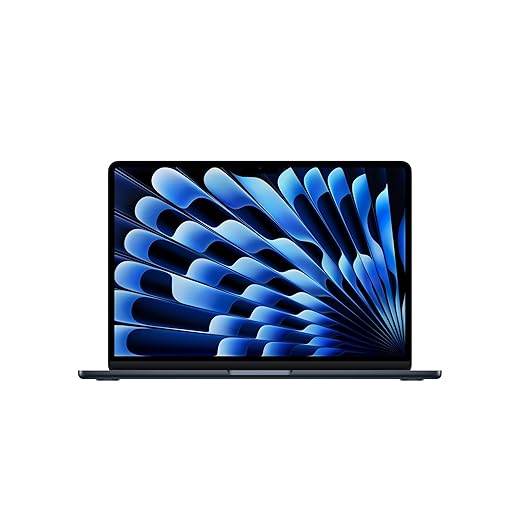
Apple 2026 MacBook Air 13-inch Laptop with M5 chip: Built for AI, 13.6-inch Liquid Retina Display, 16GB Unified Memory, 512GB SSD, 12MP Center Stage Camera,...
Features
| Product Dimensions | 8.46 x 0.44 x 11.97 inches |
| Item Weight | 2.71 pounds |
| Manufacturer | Apple |
| ASIN | B0GR1JTFP8 |
| Item model number | MDHE4LL/A |
| Date First Available | March 4, 2026 |
- MIGHT TAKES FLIGHT — MacBook Air with the M5 chip packs blazing speed and powerful AI capabilities into an incredibly portable design. With Apple Intelligence,* up to 18 hours of battery life,* and fast SSD storage starting from 512GB,* you can work, create, and play anywhere life takes you.
- SUPERCHARGED BY M5 — With its faster CPU and unified memory, the M5 chip delivers even more performance and fluidity across apps, making multitasking and creative workflows smooth and responsive. A powerful Neural Engine and next-generation GPU with Neural Accelerators give you a powerful platform for AI.
- APPLE INTELLIGENCE — Apple Intelligence is the personal intelligence system that helps you write, express yourself, and get things done effortlessly. With groundbreaking privacy protections, it gives you peace of mind that no one else can access your data — not even Apple.*
- UP TO 18 HOURS OF BATTERY LIFE — MacBook Air delivers incredible battery life with amazing performance, so you can power through a full day of work or class without worrying about plugging in.*
- A BRILLIANT 13.6-INCH DISPLAY — The Liquid Retina display supports 1 billion colors.* Photos and videos pop with rich contrast and sharp detail, and text appears supercrisp.
- 12MP CENTER STAGE CAMERA — Automatically stay in frame during video calls with Center Stage, or share a top-down view of your workspace with Desk View. And with a three-mic array and four-speaker sound system with Spatial Audio and support for Dolby Atmos, everything sounds great.
- CONNECT IT ALL — MacBook Air features two Thunderbolt 4 ports, a MagSafe charging port, and a headphone jack — as well as the Apple N1 chip for Wi-Fi 7 and Bluetooth 6.* And it supports up to two external displays.
- MACOS RUNS APPS FAST — All your go-to apps run lightning fast in macOS, including built-in apps like FaceTime and Messages. Plus, built-in virus protection and free software updates help keep your Mac running smoothly and securely.
- IF YOU LOVE IPHONE, YOU’LL LOVE MAC — Mac works like magic with your other Apple devices. View and control what’s on your iPhone from your Mac with iPhone Mirroring.* Copy something on iPhone and paste it on Mac. Send texts with Messages from your Mac, or use your Mac to answer FaceTime calls.*
- * LEGAL DISCLAIMERS — This is a summary of the main product features. See below to learn more.
}