




![Apple Watch SE (2nd Gen) [GPS 40mm] Smartwatch with Starlight Aluminum Case with Starlight Sport Band S/M. Fitness & Sleep Tracker, Crash Detection, Heart Rate Monitor](https://www.tech-bit.com/wp-content/uploads/2024/06/applewatchse2ndgengps40mmsmartwatchwithstarlightaluminumcase-360x180.jpg)

![SAMSUNG Galaxy Buds Pro 2 [2022] (SM-R510) - (Gray)](https://www.tech-bit.com/wp-content/uploads/2023/10/samsung-galaxy-buds-pro-2-2022-sm-r510-gray-360x180.jpg)








![Apple iPhone 15 Pro (128 GB) - Black Titanium | [Locked] | Boost Infinite plan required starting at $60/mo. | Unlimited Wireless | No trade-in needed to start | Get the latest iPhone every year](https://www.tech-bit.com/wp-content/uploads/2023/10/apple-iphone-15-pro-128-gb-black-titanium-locked-boost-infinite-360x180.jpg)
![Apple Watch Series 9 [GPS 41mm] Smartwatch with Pink Aluminum Case with Pink Sport Band M/L. Fitness Tracker, Blood Oxygen & ECG Apps, Always-On Retina Display](https://www.tech-bit.com/wp-content/uploads/2023/10/apple-watch-series-9-gps-41mm-smartwatch-with-pink-aluminum-case-with-pink-360x180.jpg)

















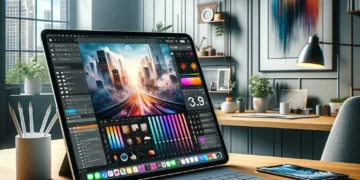
Complete Guide to the Smallest Ipad Size
As Apple continues to refine its tablet lineup in 2026, the smallest iPad size remains one of the most popular choices for consumers seeking portability without sacrificing functionality. Whether you’re a student, professional, or casual user, understanding the compact iPad options available can help you make an informed purchasing decision that fits your lifestyle and budget.
This comprehensive guide explores everything you need to know about the smallest iPad available, from its specifications and features to real-world use cases and comparisons with larger models. We’ll help you determine if the smallest iPad is the right choice for your needs.
The iPad Mini: Apple’s Smallest Tablet
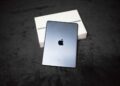
The iPad mini represents Apple’s smallest tablet offering, featuring a compact 8.3-inch Liquid Retina display. First introduced in 2012 and regularly updated since, the iPad mini has evolved into a powerful device that doesn’t compromise on performance despite its diminutive size.

The current generation iPad mini measures just 7.69 inches tall, 5.3 inches wide, and 0.25 inches thick, making it incredibly portable. At approximately 0.65 pounds (293 grams) for the Wi-Fi model and 0.66 pounds (297 grams) for the Wi-Fi plus Cellular version, it’s light enough to hold comfortably in one hand for extended periods.
The device features Apple’s powerful A-series chip, providing desktop-class performance in a pocket-friendly form factor. With support for Apple Pencil (second generation) and USB-C connectivity, the iPad mini bridges the gap between smartphone and full-sized tablet capabilities.
Key Specifications and Features
Understanding the technical specifications of the smallest iPad helps contextualize what you’re getting in such a compact package. The iPad mini delivers impressive specifications that rival its larger siblings in many areas.

Display Technology: The 8.3-inch Liquid Retina display features a resolution of 2266 x 1488 pixels at 326 pixels per inch, providing sharp text and vibrant images. The screen supports True Tone technology, which automatically adjusts white balance to match ambient lighting conditions, and offers a wide P3 color gamut for accurate color reproduction.
Performance: Equipped with a modern processor and up to 256GB of storage, the iPad mini handles demanding applications with ease. The device supports multitasking features like Split View and Slide Over, allowing users to run multiple apps simultaneously without performance degradation.
Camera System: The front-facing camera features Center Stage technology, which automatically pans and zooms to keep you in frame during video calls. The rear 12-megapixel wide camera captures high-quality photos and 4K video, making it suitable for content creation on the go.
Battery Life: Apple advertises up to 10 hours of battery life for web surfing or video watching, which aligns with the performance of larger iPad models. This endurance makes the iPad mini suitable for all-day use without frequent charging.
Connectivity: With USB-C, Wi-Fi 6, and optional 5G cellular connectivity, the iPad mini offers modern connection options for fast data transfer and internet access. Bluetooth support enables connection to wireless accessories like keyboards, headphones, and speakers.
Who Should Choose the Smallest iPad
The smallest iPad size isn’t for everyone, but certain users will find it perfectly suited to their needs. Understanding your usage patterns and priorities will help determine if the iPad mini is your ideal choice.

Commuters and Travelers: If you frequently travel or have a long commute, the iPad mini’s compact size makes it easy to slip into a bag or even a large coat pocket. It’s perfect for reading, watching videos, or catching up on work during transit without the bulk of larger tablets.
Medical and Field Professionals: Healthcare workers, retail employees, and field service technicians appreciate the iPad mini’s one-handed usability and portability. It’s easy to carry throughout a shift while still providing access to necessary applications and documentation.
Students: For note-taking with Apple Pencil, the iPad mini offers a notebook-sized digital canvas that’s easier to manage in crowded lecture halls or study spaces. Combined with its ability to handle textbooks and educational apps, it serves as a comprehensive learning tool.
Reading Enthusiasts: The 8.3-inch display strikes an excellent balance for reading e-books, magazines, and comic books. It’s larger than most smartphones but more manageable than a 10-inch or 11-inch tablet for extended reading sessions. Just as the NHS recommends regular movement breaks for physical health, the iPad mini’s lightweight design encourages healthy device handling postures during extended use.
Content Consumers: If you primarily use your tablet for streaming video, browsing social media, and casual gaming, the iPad mini provides a more immersive experience than a smartphone while remaining easily portable.
Comparing the iPad Mini to Larger Models
To make an informed decision, it’s important to understand how the smallest iPad compares to Apple’s larger tablet offerings, including the standard iPad, iPad Air, and iPad Pro models.
Size and Portability: The iPad mini is significantly smaller than the 10.9-inch iPad Air or 11-inch iPad Pro, making it more portable but offering less screen real estate. The standard iPad at 10.2 inches falls in the middle. For tasks requiring extensive multitasking or detailed visual work, larger screens provide advantages. For portability-focused users, the mini wins decisively.
Price Point: The iPad mini typically sits in the mid-range of Apple’s tablet pricing, costing more than the base iPad but less than iPad Air or iPad Pro models. This positioning reflects its premium features in a compact form factor, though you’re paying a slight premium per square inch of display compared to larger models.
Performance: While processor generations vary across the lineup, the iPad mini generally matches or comes close to the performance of the standard iPad and lower-tier iPad Air models. The iPad Pro remains Apple’s most powerful tablet option, but for most users, the iPad mini provides more than adequate performance.
Accessory Ecosystem: The iPad mini supports the second-generation Apple Pencil, which attaches magnetically and charges wirelessly. However, it lacks the Smart Connector found on larger iPads, limiting keyboard case options. This makes it less ideal as a laptop replacement but perfectly suited for stylus-based input and touch navigation.
Use Case Optimization: Larger iPads excel at productivity tasks like document editing, spreadsheet work, and creative applications where screen space matters. The iPad mini shines in consumption scenarios, mobile use cases, and situations where one-handed operation is valuable.
Accessories to Enhance Your Small iPad Experience
Maximizing the utility of the smallest iPad involves selecting the right accessories to complement its compact design without negating its portability advantages.
Apple Pencil: The second-generation Apple Pencil transforms the iPad mini into a powerful note-taking and sketching device. Its magnetic attachment and wireless charging make it a natural companion for the small tablet, though users should note the drawing canvas is smaller than on larger iPads.
Cases and Covers: Numerous third-party manufacturers offer protective cases designed specifically for the iPad mini. Look for options that add minimal bulk while providing adequate protection. Folding cases with stand functionality enhance viewing angles for media consumption.
Bluetooth Keyboards: While the iPad mini doesn’t support the Magic Keyboard designed for larger iPads, many compact Bluetooth keyboards pair well with it for occasional typing tasks. Choose models that balance portability with comfortable key spacing.
Screen Protectors: A tempered glass screen protector adds an extra layer of protection for the Liquid Retina display, particularly important for a device likely to be carried frequently. Matte protectors can reduce glare and provide a paper-like texture for Apple Pencil users.
Stands and Mounts: Desktop stands, car mounts, and kitchen stands extend the iPad mini’s versatility, allowing hands-free use for video calls, recipe viewing, or entertainment.
Tips for Getting the Most from Your Compact iPad
Optimizing your experience with the smallest iPad involves understanding both its strengths and limitations, then adjusting your usage patterns accordingly.
Take advantage of the iPad mini’s portability by incorporating it into situations where larger devices would be impractical. Keep it charged and ready in your bag for unexpected opportunities to be productive or entertained. The device’s size makes it perfect for quick reference tasks throughout the day.
Customize your home screen organization for one-handed use by placing frequently accessed apps within easy thumb reach. Consider using widgets effectively to maximize information density on the smaller display.
For reading-intensive tasks, enable features like Dark Mode and adjust text size to reduce eye strain. The iPad mini’s screen size is optimal for reading when properly configured, rivaling dedicated e-readers while offering far more functionality.
When using the Apple Pencil, zoom in frequently for detailed work. The smaller canvas doesn’t have to limit your creative output if you adjust your workflow to work at higher zoom levels for precision tasks.
Regular physical activity is important when using any device extensively, and as research from institutions like the American College of Sports Medicine demonstrates, taking breaks from screen time supports overall health. The iPad mini’s portability actually encourages more dynamic usage patterns, allowing you to move between locations rather than remaining stationary with a heavier device.
Conclusion
The smallest iPad size, represented by the iPad mini, offers a compelling combination of portability, performance, and functionality that serves a distinct segment of tablet users. With its 8.3-inch display, powerful processor, and support for modern accessories like the Apple Pencil, it proves that good things indeed come in small packages.
Whether you’re a commuter seeking entertainment, a professional needing mobile access to work applications, or simply someone who values portability above all else, the iPad mini deserves serious consideration. While it may not replace a laptop for intensive productivity work or satisfy those who prefer larger screens for media consumption, it excels in its intended role as the most portable full-featured tablet in Apple’s lineup.
As you evaluate your tablet needs in 2026, consider how often you’ll truly be mobile with your device, what tasks you’ll perform most frequently, and whether the trade-off of screen size for unprecedented portability aligns with your priorities. For many users, the smallest iPad represents the perfect balance, delivering the iOS ecosystem’s benefits in a form factor that fits seamlessly into modern mobile lifestyles.